Coached practice software gives learners repeated, guided rehearsal of real tasks, such as role plays, simulations and feedback, between teaching sessions. In New Zealand it is an unregulated category: NZQA regulates your PTE, not the tool. So judge any option on three things. Does it map to your unit standards? Do qualified assessors keep every competency decision? Does it fit your privacy, accessibility and record-keeping obligations?
What is coached practice software, and how is it different from e-learning?
E-learning and LMS content mostly tells learners things. Coached practice makes them do things: talk a difficult customer through a complaint, work through a hazard scenario, or attempt a calculation and get feedback straight away. The coaching is the point. It replaces the facilitator or role-play partner you can't be present for every evening.
There is no neutral definition to lean on. The research found no NZQA, TEC or Ministry of Education definition of "coached practice software", and no independent NZ comparison, analyst report or pricing benchmark. Most published guidance is vendor-authored. Treat it accordingly, including this guide's mentions of our own product.
Two more things to know before you search:
- Generic AI role-play tools are mostly built for corporate sales. Products such as ELB Learning's Rehearsal and NovoEd's Practice+ AI Roleplay are aimed mainly at sales enablement and L&D, not NZ vocational standards.
- Search results are noisy. Expect plenty of Pearson Test of English coaching and fitness-coach software. Add "unit standards" or "PTE (private training establishment)" to your queries.
Does NZQA approve this kind of software?
No. NZQA regulates the PTE and its compliance with the Education and Training Act 2020 (sections 342 to 361) and the Private Training Establishment Rules. The research found no NZQA approval scheme for practice tools. It also found no NZQA position on AI-generated role plays or AI feedback in assessment.
In practice, that means the accountability stays with you. If a vendor says its tool is "NZQA-aligned", ask what that means. It can only mean the content maps to standards you assess against. It cannot mean NZQA has approved the product.
The rules are also moving. The Private Training Establishment Rules 2026 replace the 2025 Registration Rules and the 2022 Enrolment and Academic Records Rules. The page we retrieved showed no commencement date, so confirm it on the NZQA site before you build processes around it.
How do you check practice maps to your unit standards and stays formative?
Registered PTEs assess against standards on the Directory of Assessment and Skill Standards. That is the yardstick for any generated scenario. Supahuman's own NZ guidance says a qualified assessor or moderator must still check that a generated scenario maps to the relevant unit standard or skill standard. That advice applies to every tool, not just ours.
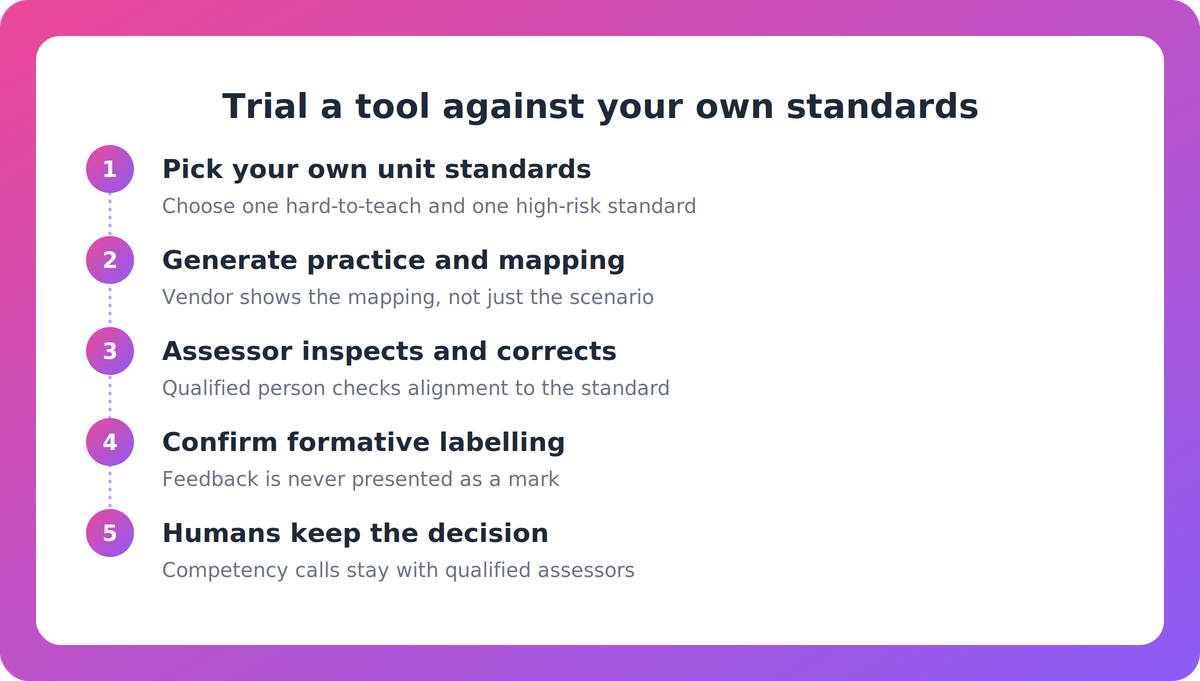
A workable test:
- Choose two or three of your own unit standards, ideally one that is hard to teach and one that is high-risk.
- Ask the vendor to generate practice for them and show the mapping, not just the scenario.
- Have an assessor or moderator inspect and correct the mapping. If they can't edit it, that's a red flag.
- Check how feedback is labelled. It should be clearly formative, never presented as a mark or a competent/not-yet-competent call.
- Confirm who signs off. Competency decisions stay with qualified humans, and the evidence trail should show it.
The standards landscape is shifting too. Vocational education legislation passed in October 2025. Te Pūkenga (renamed NZIST) is transitional and due to be disestablished on or before 31 March 2027. Industry Skills Boards replace Workforce Development Councils, and Muka Tangata describes them as setting training standards, endorsing programmes and moderating assessments. Check which body now sets the standards you teach, and ask how quickly the vendor's content can follow a change.
What should you ask a vendor?
Use these criteria to compare options on equal terms.
- Standards mapping: can it map to unit standards, skill standards or NZQF qualifications, and can your people inspect it?
- Human accountability: is a qualified person in the review loop?
- Formative boundary: is feedback labelled formative only?
- Delivery fit: does it work through your LMS (SCORM or LTI 1.3), a hosted link or a mobile app? What do learners sign in with?
- Accessibility: how does it support the accessible digital learning environments expected under Outcome 3 of the Pastoral Care Code 2021? NZQA administers the Code, and PTEs enrolling international students must be signatories.
- Privacy and security: where is data hosted, how does the vendor handle the NZ Privacy Act, and what certifications exist?
- Record-keeping: can you retain the evidence your obligations under the Rules require?
- Change management: who approves updates, and how fast do they land?
- Evidence of outcomes: is there independent NZ evidence, or only vendor-reported results? Ask for reference sites and a trial using your scenarios.
- Pricing: get a clear quote and total cost, not a demo-day estimate.
Where does Nova by Supahuman fit?
Nova is one option built for vocational providers, so here is what we can say and where to push back. Supahuman is Auckland-headquartered. According to its own material, Nova generates role plays, simulations, video and coached practice. That includes voice role plays against an AI counterpart, branching scenarios, calculation practice, and hazard identification and fault finding. Supahuman says it offers twenty activity types mapped to your standards, and that for PTEs it reads uploaded unit standard and programme material and maps practice back to unit standards for moderation.
Nova is described as formative only. Learners can upload mock assessments and get criterion-by-criterion feedback, but it does not mark, and assessors keep every competency decision. Delivery is via a hosted link, a phone app or your LMS (SCORM and LTI 1.3). It is the delivery companion to VETos, which designs and validates materials, and the two can be used together or separately.
Now the caveats. Mast Academy, an NZ PTE, is the named customer. The one quantified NZ result, authoring cut from around six weeks to minutes, relates to VETos, not Nova. It is vendor-reported and went through the provider's own moderation. We found no NZ learner-outcome data for Nova, and no published hosting location, certifications or NZ pricing. Ask us for those directly, as you would any vendor.
A sensible next step
Before you talk to anyone, write down the three unit standards you'd trial and who on your team would review the mapping. Then put the criteria above to every vendor on your shortlist. If you'd like to see how Nova handles your material, you can start at supahuman.com. This guide should still be useful if you never do.
Key takeaways
- Coached practice software is unregulated in NZ. NZQA regulates your PTE under the Education and Training Act 2020 and the PTE Rules, not the tool.
- Standards mapping is the core test. Trial any tool against your own unit standards and have an assessor or moderator check the mapping.
- Keep practice formative. Qualified humans keep every competency decision, and AI assists rather than signs off.
- Ask about accessibility under the Pastoral Care Code, Privacy Act handling, data hosting, record-keeping and total cost.
- Most guidance and outcome claims are vendor-authored, so ask for NZ reference sites and test with your own scenarios.
Our take
The sensible way to buy in this category is to treat it as a tool for a trained assessor, not a replacement for one. The vendors worth your time will let your moderators open the hood, show you where the AI stops, and admit what they can't yet prove in NZ. Be wary of anyone, us included, whose case rests on a single vendor-reported number. The reform of the vocational system makes a flexible, editable mapping more valuable than a polished demo.
FAQ
What is coached practice software?
It is software that lets learners rehearse realistic tasks, such as role plays, simulations and guided exercises, and get feedback each time. Unlike static e-learning, it is interactive. Unlike generic AI role-play tools built for corporate sales, a vocational version should map to your unit standards.
Does NZQA regulate or approve coached practice software?
No. NZQA regulates PTEs and their compliance with the Education and Training Act 2020 and the PTE Rules. The research found no NZQA approval scheme for practice tools and no NZQA position on AI-generated role plays or feedback. The PTE stays accountable for how it uses them.
How do we keep AI-generated practice formative?
Choose a tool that labels feedback as formative, never presents it as a mark, and leaves competency decisions with qualified assessors. Ask the vendor to show this in the product, and keep an assessor or moderator in the loop to check mapping to the relevant unit standard or skill standard.
What should we ask about privacy and accessibility?
Ask where data is hosted, how the vendor handles the NZ Privacy Act, and what certifications it holds. For accessibility, ask how the tool supports the accessible digital learning environments expected under Outcome 3 of the Pastoral Care Code. Also confirm how learners sign in and how records are retained.
Is there independent evidence that this works in NZ?
The research found no independent NZ comparison or outcome study. Published results are mostly vendor-reported. Ask for reference sites, trial the tool on your own unit standards, and judge it on your own learners' results.