Yes, an RTO can use an AI assessment generator, but ASQA treats AI as sitting inside existing obligations under the Standards for RTOs 2025. Qualified people must still review, contextualise and validate every draft. So choose a tool for how well it supports human review, scope-accurate mapping and an evidence trail, not how fast it drafts.
Is it acceptable to use AI to write unit of competency assessment tools?
It is, with conditions. The 2025 Standards for RTOs took effect on 1 July 2025, and ASQA has released five Principles for the Responsible Use of AI in VET. ASQA states the principles introduce no new regulatory requirements. They give a structured way to interpret and oversee AI use within the obligations you already have.
Principle 5 is the one buyers should read twice. All training product requirements must still be met where AI is used, whether or not AI is mentioned in the training product. A generated tool still has to meet the unit of competency, the Principles of Assessment and the Rules of Evidence.
In practice, treat every generated assessment as a draft. Your assessors check it against the training package and sign it off before it reaches a learner.
What does ASQA's Assessment Practice Guide expect?
The Assessment Practice Guide gives examples of compliant activity that map neatly onto a buying decision:
- Standard 1.3: consult industry to confirm the tool's content is correct and relevant, and confirm AI-assisted assessments align to actual workplace expectations.
- Standard 1.4: where AI-assisted work is involved, gather additional evidence, such as oral questioning or practical demonstration, to supplement it.
- Pre-use review: be able to show how a tool was reviewed before it was used.
ASQA also asks who checks AI-supported material before use, and how AI tools collect, use, store and share information. Note that ASQA hasn't published a buyer checklist. The criteria below are our reading of these expectations, not an ASQA list.
Some consultancies report that ASQA said at 2026 workshops that AI cannot make assessment decisions or complete validation where qualified people are required. We couldn't confirm that on an ASQA page, so verify it with ASQA before relying on it.
What should an AI assessment generator do?
The test is whether you can still prove your tools were reviewed by qualified people. Weigh these criteria:
- Human review and sign-off. Can an assessor check the draft against the training package and record sign-off? Be wary of any vendor that presents drafts as finished, compliance-ready instruments.
- Currency with training.gov.au. How does the tool keep units, elements and performance criteria in step with the national register? How does it flag superseded or changed units?
- Mapping and traceability. Is every task mapped back to the unit? Does the mapping update when you adapt a task? Can you export it for validation and audit?
- Practical and observed assessment. Some skills can't be assessed with a written task alone. Look for support for simulated scenarios with workplace context, plus supplementary evidence such as oral questioning or demonstration.
- Contextualisation. Can outputs be tailored to your industry, cohort and delivery mode? Your own industry consultation still needs to be recorded.
- Evidence trail. Version history and pre-use review records should slot into your own validation and continuous improvement processes.
- Privacy and data handling. How is learner and organisational data collected, used, stored and shared?
How do you tell a VET-specific generator from a general-purpose chatbot?
A general chatbot can draft questions. You supply the unit, prompt it, check every element and performance criterion yourself, and build your own mapping and records. That's workable for a confident assessor, but the compliance work stays entirely with you.
A VET-specific tool is built around Australian training package structures. It should hold your scope, pull unit requirements from training.gov.au and keep each assessment linked to them. It should also produce something you can export and show an auditor.
Neither type removes the need for a qualified assessor. The difference is how much of the traceability is done for you.
What questions should you ask a vendor?
Take these into every demo:
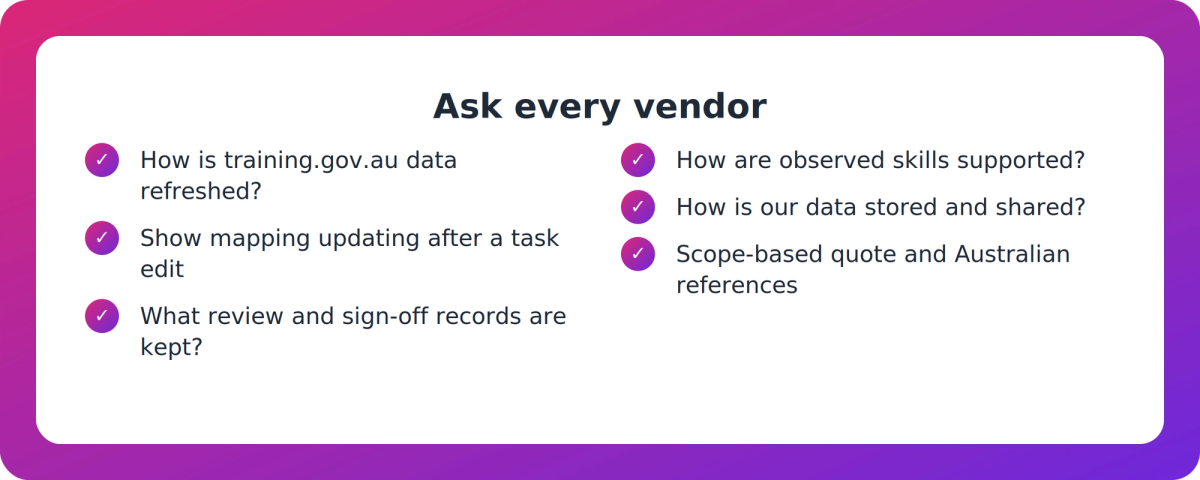
- How do you source and refresh unit data from training.gov.au, and what happens when a unit is superseded?
- Show me the mapping for one task. What happens to it when I edit that task?
- What does your workflow record between draft and approved? Who signed off, and when?
- How do you handle skills that need observation or oral questioning?
- How is our data stored, used and shared, and is it used to train models?
- Can you provide scope-based pricing and Australian customer references?
Treat any per-unit price quoted in a third-party comparison as unverified. For supplier assurance on AI more broadly, the government's Voluntary AI Safety Standard includes procurement guidance and 10 voluntary guardrails. It's a useful reference, not a VET compliance requirement.
Where does VETos fit?
VETos, from Supahuman, is one option in this category. It's an AI platform for Australian training providers that drafts assessment tools, assessor guides, learner guides and mapping for units on your scope. It holds that scope with units, elements and performance criteria from training.gov.au. It generates a mapping matrix from live data and updates it when a task is adapted. You can read more at vet.supahuman.com.
Its own materials say AI-generated or AI-mapped content must still be validated by a qualified assessor before use. Exports for pre-use review keep version history, and pre-validation checks can flag gaps. Those checks aid the review. They don't replace it. For skills that can't be observed directly, it can generate a simulated scenario, which remains a starting point until a trainer or assessor signs it off.
Here are the caveats. Its speed claims are vendor statements with no published Australian benchmarks, and we found no named Australian RTO case studies. One independent comparison describes it as a documentation generator that stops at the point of documentation. Pricing is based on scope.
Key takeaways
- ASQA's five AI principles add no new rules. AI use sits inside the Standards for RTOs 2025, and Principle 5 says all training product requirements still apply.
- Treat every generated assessment as a draft that qualified assessors check against the training package and sign off.
- Buy on review support, training.gov.au currency, traceable mapping, practical evidence support and data handling, not drafting speed.
- A VET-specific tool should reduce your traceability work. A general chatbot leaves all of it with you.
- Ask for scope-based quotes and Australian references, and verify unconfirmed claims about ASQA's position with ASQA.
Our take
The market sells speed because speed is easy to demo. But the cost of a bad assessment tool shows up months later, in validation or an audit, when someone asks who checked it and against what. We'd weigh a tool by how cleanly it lets a qualified person say "I reviewed this, here's the record." A slower draft with a clear evidence trail beats a fast one you can't defend.
FAQ
Is it acceptable under ASQA's expectations to use AI to write assessment tools?
Yes, within existing obligations. ASQA says its five AI principles introduce no new requirements. Qualified people must still review and validate AI-assisted tools, and the unit, the Principles of Assessment and the Rules of Evidence must still be met.
What should an AI assessment generator do so we can show tools were reviewed?
It should export drafts for review, keep version history and link every task to the unit. Your assessors then check the draft against the training package and record sign-off before use. The RTO remains accountable for the outcome.
How do I tell a VET-specific generator from a general chatbot?
Ask whether it's built around Australian training package structures. A VET-specific tool holds your scope, draws unit data from training.gov.au and keeps mapping linked to each task. With a general chatbot, you prompt, map and check everything from scratch.
What should I ask a vendor about currency, mapping, audit trail and data handling?
Ask how unit data stays current with training.gov.au, how superseded units are flagged, and how mapping updates when tasks change. Also ask what review records are kept, and how learner and organisational data is collected, used, stored and shared.