AI Assessment Generator for NZQA Unit Standards: A Buyer Guide
Yes, you can use an AI assessment generator to draft NZQA unit standard assessments, provided a qualified assessor reviews, edits and signs off every draft and it goes through your own pre-assessment moderation. NZQA has no rule that approves or prohibits AI-drafted tertiary materials. Accountability sits with your existing consent to assess, CMR and moderation obligations.
Key takeaways
- An AI draft is just another set of materials. It goes through your own moderation, and the qualified assessor stays accountable.
- Judge a tool on traceable mapping to the current standard and its CMR, visible human sign-off and version history. Don't judge it on how fast it drafts.
- Ask how the tool handles the move from unit standards to skill standards under the Industry Skills Boards (ISBs), so your existing materials aren't orphaned.
- Check data handling against the Privacy Act 2020, especially if learner work or assessor records ever enter the tool.
- No independent certification of these tools exists. Ask vendors directly for output-quality evidence and moderation outcomes.
Is it acceptable to use AI to draft NZQA unit standard assessments?
It is, with conditions, and the conditions come from rules you already follow. An organisation needs consent to assess against standards on the Directory of Assessment and Skill Standards (DASS) before it can award them. Every DASS standard is attached to a Consent and Moderation Requirements (CMR) document, which sets out the national external moderation system that applies.
Internal moderation must also be embedded in your quality management system. That covers pre-assessment moderation of materials and post-assessment moderation of learner work, per NZQA's moderation guidance. The Programme Approval, Recognition and Accreditation Rules 2026 also expect assessment to be fair, valid, consistent and appropriate, with an effective system for moderating materials and decisions.
None of that mentions who or what wrote the first draft. So the practical position is simple: the draft's origin doesn't change your obligations.
One caution. The NZQA and Ministry of Education AI guidance we found is for schools (NCEA). NZQA's schools guidance is useful context, but it is not a tertiary rule. NZQA's tertiary page on academic integrity and AI exists, but we couldn't read it directly, so check it yourself.
What should an AI generator do so drafts fit your CMR and moderation?
It should make the assessor's job easier to do properly, not easier to skip. Use these criteria:
- Mapping to the current standard. Drafts should trace to the specific DASS standard and version, its elements and performance criteria, and the relevant CMR.
- Visible human review. The workflow should show assessor review and sign-off before moderation. AI should never appear as the decision-maker.
- Moderation-ready support. Look for assessor guides with marking guidance and moderation instructions, plus version history and change logs.
- Context fit. It should adapt to your industry, delivery mode (classroom, workplace, distance) and learner needs such as ESOL or LLN without a full rewrite.
- A gap check. Ideally it flags coverage gaps before the material reaches your moderator.
Check which body holds the CMR for each standard you assess. That detail is shifting, and a tool that ignores it is guessing.
A safe workflow (illustrative)
Here's a hypothetical example of how a PTE might use a generator. It is a sketch, not a customer story.
- A qualified assessor selects a unit standard on the PTE's scope and confirms the current version.
- The tool drafts an assessment, assessor guide and mapping for the PTE's industry and delivery mode.
- The assessor reviews the draft line by line against the elements and performance criteria, then edits it.
- The assessor signs off, and the sign-off is recorded.
- The material goes into the PTE's normal pre-assessment moderation, and the moderator's changes are logged.
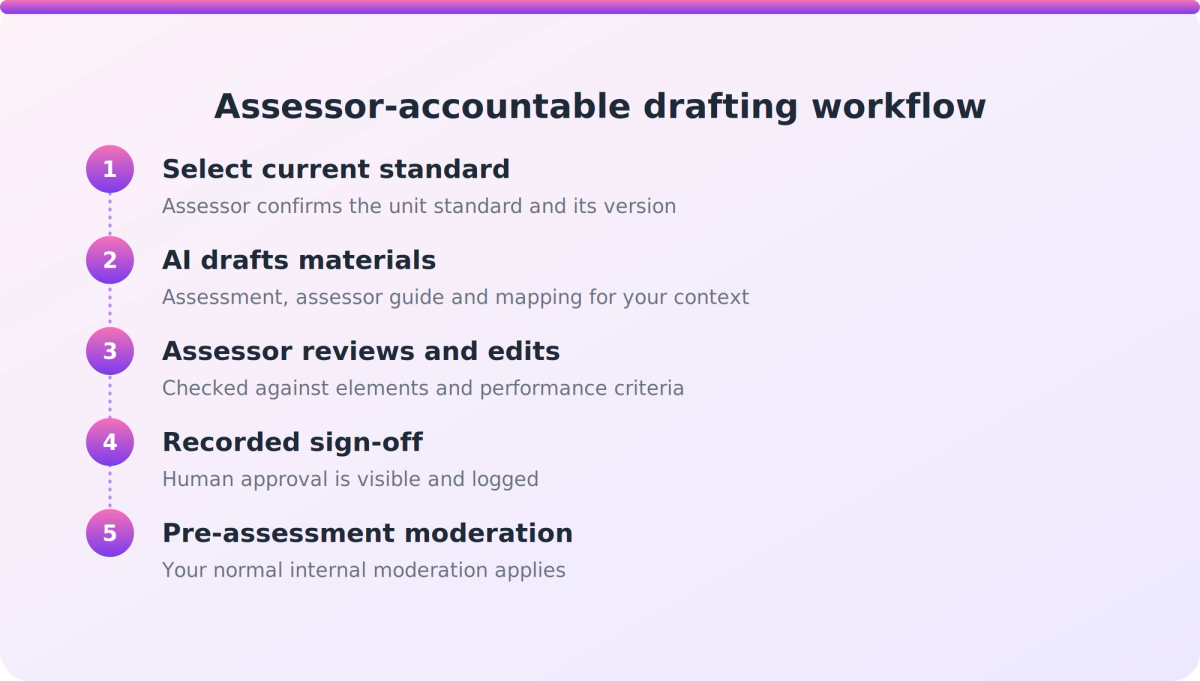
The time saving, if any, comes from starting at step 3 rather than a blank page. Steps 3 to 5 stay human.
How do you judge mapping, versions and data handling during the skill standards shift?
Ask how the tool treats change, not just how it treats today's standard. Five NZQA rule sets and the NZQCF changed on 1 July 2025. The DASS Rules note the terminology change from Workforce Development Councils to ISBs. NZQA is also rolling out the Integrated Quality Assurance Framework (iQAF), and skill standards are expected to replace unit standards over time.
So ask a vendor:
- Does it hold both unit standards and skill standards?
- Can it draft against a skill standard's learning outcomes and assessment specifications?
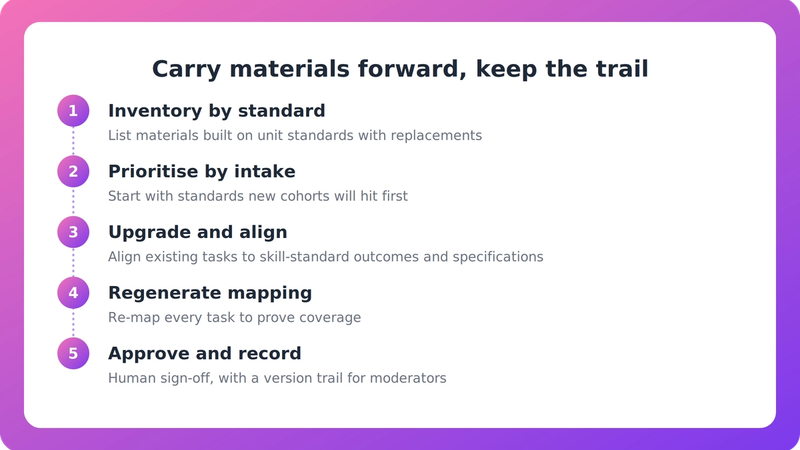
- When a standard changes, are your existing materials updated and flagged, or left behind?
- Is there a version trail your moderator can follow?
For a wider view of library readiness, see this guide on the skill standards transition.
Data handling
The Privacy Act 2020 applies when personal information goes into AI tools. The Privacy Commissioner's AI guidance says the information privacy principles apply from training data through to prompts and outputs. That guidance is non-binding, and a Privacy Impact Assessment is recommended rather than mandatory.
It matters most if learner work or assessor records enter the tool. A tool that drafts only generic assessment content may not touch personal information at all. Ask what goes in, whether inputs are used for training, and where data is stored. Also check fit with your own AI-use policy and NZQA's academic integrity guidance.
What evidence should you ask a vendor for?
Ask for evidence, because there's no independent certification to lean on. We found no public independent evaluation framework for these tools. Evaluation runs through your own moderation, consent and programme approval processes, plus a privacy assessment. Ask for:
- Samples of drafts with their mapping and assessor guides, for a standard you actually assess.
- NZQA moderation outcomes on material the tool helped produce, if any exist.
- Independent audits of output quality, if they exist. If they don't, ask them to say so.
- The basis of any time-saving claim. Check what is measured: drafting time, or the assessor's review and sign-off time as well.
- Pricing, which isn't publicly available for these tools.
Where does SupaHuman VETos fit?
VETos is one option in this category, and a fair fit for some PTEs. SupaHuman's FAQ says it drafts assessment tools, assessor guides, learner guides and mapping for the units on your scope. Everything is mapped back to the relevant unit standard with traceable mapping, and each assessment is checked for gaps before moderation. Assessor guides are described as including rubrics, exemplar responses and moderation instructions.
Its NZ materials say AI-generated assessments still need human review and that the qualified assessor remains accountable. They also say VETos holds both unit and skill standards and keeps a version trail moderators can follow.
Some limits to keep in mind. Assessor Quality Assurance (AQA) is marked 'coming soon', so don't assume it today. Mast Academy, an NZ PTE, reports an 80% reduction in course creation time (assessment plus study guide). That figure is vendor-reported, not independently verified, and it isn't a measure of assessor sign-off time. Independent audits, moderation outcomes and pricing aren't publicly available, so ask for them directly, as you would with any vendor.
Our take
The most useful question isn't "how fast does it draft?" but "how easy does it make a proper review?" A tool that hides the assessor's sign-off or buries the mapping is a liability, however quick it is. We'd put the standards transition near the top of any shortlist, because a generator that can't follow the move to skill standards will leave you with a library to rebuild. And treat any speed claim, ours included, as a prompt for questions rather than an answer.
FAQ
Is it acceptable to use AI to draft NZQA unit standard assessments?
Yes, with conditions. We found no NZQA rule that approves or prohibits AI-drafted tertiary materials. Your consent to assess, CMR and moderation obligations still apply, so a qualified assessor must review and sign off, and the draft goes through your own pre-assessment moderation.
Who is accountable for an AI-drafted assessment?
The qualified assessor and your organisation. AI assists with drafting. It doesn't validate, moderate or sign off, and it doesn't remove your compliance obligations.
What should I check about the move to skill standards?
Ask whether the tool holds both unit and skill standards, drafts against skill standard learning outcomes and assessment specifications, and keeps a version trail. Also confirm which body holds the CMR for each standard you assess.
What evidence should I ask a vendor for?
Ask for sample drafts with mapping, NZQA moderation outcomes, independent audits if any exist, the basis of time-saving claims, and a clear account of data handling under the Privacy Act 2020. No independent certification exists, so this evidence is your main check.
Next step
Before talking to any vendor, pick one unit standard you assess and run a draft through your own moderation checklist. If you'd like to see how VETos handles that, you can start from SupaHuman's NZ page and ask for sample output, mapping and moderation evidence.