Yes. A PTE or other TEO can use AI to draft assessment tasks for NZQA-registered unit standards, but the draft is only input. NZQA makes the provider responsible for internal moderation and for taking part in national external moderation. We found no NZQA guidance on AI-drafted tasks, and no NZQA approval scheme for AI assessment tools.
Does NZQA have rules about AI-drafted assessment tasks?
Not specifically, as far as we can find. The rules that apply are the ones you already work under.
NZQA's Assessment of standards guidance says providers need consent to assess a standard. Providers must then carry out internal moderation and take part in the national external moderation system that applies to that standard. Each standard on the Directory of Assessment and Skill Standards (DASS) has Consent and Moderation Requirements (CMR). Workforce Development Councils manage national external moderation for industry unit standards. NZQA organises it for the standards it is responsible for.
NZQA's published AI guidance is about learner use. Generative AI is not permitted in external assessment. Schools with consent to assess DASS-listed standards need an authenticity policy that covers acceptable AI use. The guidance also advises care with AI detectors because of false positives. None of that tells you how to draft a task. We also found no NZQA rule on telling moderators that a task was AI-drafted. Treat that as unconfirmed rather than assuming either way.
The closest official analogue comes from the Ministry of Education, which says AI tools for marking should support teachers' professional judgement, not replace it. Drafting should be read the same way.
Who stays accountable for moderation if AI drafted the task?
You do. The tool doesn't take on any of it.
Internal moderation sits inside the provider's quality management system. It covers pre-assessment moderation of materials as well as post-assessment moderation of learner work. NZQA's school guidance says assessment material is critiqued and re-contextualised or modified as necessary before use. That is written for schools, but it is the clearest basis for treating AI output as a draft that people must review.
There is a practical risk too. Where assessor judgements look weak, NZQA can moderate the tasks and activities themselves to check they are at the national standard. A poorly drafted task that slips through becomes your moderation problem, whoever or whatever wrote the first version.
What should you look for in an AI assessment-writing tool?
The question is which tool keeps drafts mapped, reviewable and traceable, not which is fastest. Weigh these:
- Mapping. Are drafts mapped to the specific unit standard, its elements and performance criteria? Can you check them against the standard's CMR and assessment specifications?
- Human sign-off. Can a qualified person review, edit and approve every draft before use? Can your process record who did it and when?
- Moderation support. Are there assessor guides, version history and change logs that make pre-assessment moderation and external moderation reports easier? Ask for a demonstration, not a claim.
- Editable outputs. Can you export to formats your team already uses, such as Word, so tasks can be revised and re-contextualised?
- Privacy and data. Can you complete a Privacy Impact Assessment? You need to know where data is stored and whether prompts or uploaded material are retained.
- Fit with your authenticity policy. Does the tool's use sit inside the AI rules you have already set?
- Evidence. Ask for NZ customer references and outcomes. Treat speed claims as unverified until you've tested them.
Watch for approval claims
NZQA has no accreditation scheme for AI assessment-writing tools. The Privacy Commissioner's office does not approve or endorse any AI provider either. A vendor claiming either "NZQA approved" or "Privacy Commissioner approved" deserves a hard question.
On privacy, the Privacy Act 2020 covers generative AI. The Commissioner expects organisations to consider whether a tool is necessary and proportionate, and to do a Privacy Impact Assessment before use.
How should you trial an AI drafting tool?
Borrow NZQA's own method. When NZQA looked at AI marking, it piloted with historic material and would only expand AI use if results were as good as or better than human work. You can do the same with drafting.
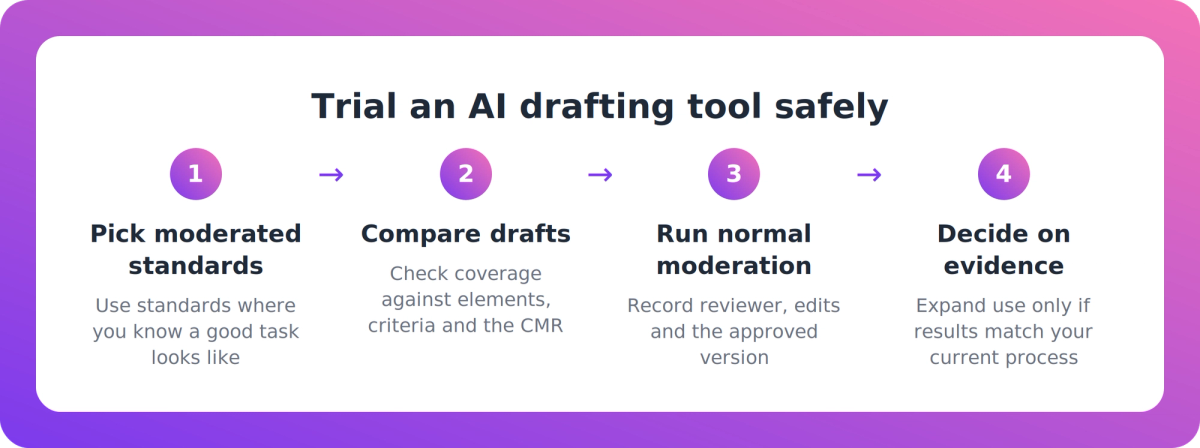
- Pick standards you already moderate. You know what a good, moderated task looks like, and you hold the moderator feedback.
- Draft with the tool, then compare. Set the AI draft beside your existing task. Check coverage of every element and performance criterion, and the level against the CMR.
- Run it through your normal pre-assessment moderation. Don't create a shortcut for AI-drafted work. Record the reviewer, the changes made and the version approved.
- Complete the Privacy Impact Assessment before real material goes in. Don't wait until after the trial.
- Decide on evidence. Count the edits needed, the gaps found and the time spent reviewing. Then decide whether it goes into your quality management system, and with what limits.
Where does VETos fit?
Fairly, for some providers. VETos is the Supahuman product that drafts assessment tools. Its site says it produces assessment tools, assessor guides, learner guides and mapping for units on your scope. It also says each assessment is mapped back to the unit standard's elements and performance criteria, checked for gaps before moderation, and exported to editable Word and InDesign (.idml).
Those are our own claims, not independent evidence. Our material says educators review and refine the AI-generated content, and that accountability for quality stays with the provider. We say tutors start from a mapped draft rather than a blank page, and that this shortens the path to an assessment from weeks to days. That is unverified, and we haven't published NZ customer outcomes or case studies.
Our sites also don't describe a specific moderation workflow, such as pre-moderation submission or moderator sign-off tracking. So ask for a demonstration and test it on your own unit standards. If it doesn't hold up against your existing moderated tasks, don't buy it.
Nova is a separate product. It gives learners criterion-by-criterion feedback before a real submission. It doesn't mark and never makes a competency decision. It isn't the tool for drafting NZQA summative assessment tasks.
Key takeaways
- AI can draft unit-standard assessment tasks, but your qualified people must critique, edit and sign off every task before use.
- Internal moderation and participation in national external moderation stay with the provider, whatever tool wrote the draft.
- We found no NZQA guidance on AI-drafted tasks and no approval scheme for AI tools. Question any vendor claim of NZQA or Privacy Commissioner approval.
- Choose on mapping, sign-off records, version history, editable exports and privacy, not on speed.
- Trial against standards you already moderate, and complete a Privacy Impact Assessment first.
Our take
The sensible way to buy in this category is to treat AI as a fast, tireless first-draft writer and nothing more. The tool that wins is the one that makes your review easier to do and easier to evidence, not the one that produces the most pages. If a vendor's pitch is about removing steps from moderation, walk away. Spend the time you save on drafting on better critique.
FAQ
Can a PTE use AI to draft assessment tasks for NZQA unit standards?
Yes, as long as the draft goes through your own internal moderation and sign-off before use. NZQA holds the provider responsible for pre-assessment moderation of materials and for participating in national external moderation. We found no NZQA guidance specific to AI-drafted tasks.
Who is accountable if an AI tool drafted the assessment?
The provider. Internal moderation sits in your quality management system, and NZQA can moderate tasks and activities directly where assessor judgements look weak. A tool can speed up drafting, but it can't take over accountability.
Is there an NZQA-approved AI assessment-writing tool?
We found no NZQA accreditation or approval scheme for AI assessment-writing tools. The Privacy Commissioner's office also doesn't approve or endorse AI providers. Ask any vendor making either claim to show you the source.
What should I check before putting data into an AI drafting tool?
Complete a Privacy Impact Assessment first. The Privacy Act 2020 covers generative AI, and the Commissioner expects agencies to consider whether a tool is necessary and proportionate. Find out where data is stored and whether prompts or uploads are retained.
How do I trial an AI drafting tool safely?
Pilot it on unit standards you already moderate. Compare the drafts with your existing tasks and moderator feedback, run them through normal pre-assessment moderation, and record who approved what. Expand use only if the results are at least as good as your current process.