A NZ PTE can use an AI assessment writing tool to draft assessment tasks, but NZQA assesses your assessment and moderation system, not the software. Every AI draft still needs a qualified assessor's review, internal moderation and a check against the current standard and its Consent and Moderation Requirements (CMR).
Key takeaways
- The buying question isn't "which AI writes the best assessment?" It's "which tool fits inside a moderation system we're accountable for?"
- AI-drafted tasks count as assessment materials under NZQA's rules, so they face the same fair, valid and consistent tests as anything written by hand.
- Weigh tools on assessor sign-off, standards mapping, an audit trail, and privacy and hosting terms. Output polish comes last.
- No NZQA statement was found on staff using AI to draft tasks in PTEs. Confirm current expectations with NZQA directly.
- Vendor results, including ours, are self-reported. Verify them through a trial on your own standards and through references.
What does an AI assessment writing tool actually do?
It drafts assessment instruments, such as tasks, marking guides and assessor guides, from the text of a unit or skill standard. That's the vendor description, and there's no regulator definition of the category. Supahuman's NZ buyer's guide uses similar language, so read it, and every other vendor's version, as marketing.
The practical value is a faster first draft. Your assessors review something instead of starting from a blank page. What the tool can't do is decide whether the task is valid for your learners, your delivery mode or your consent to assess.
Who stays accountable, and what does NZQA say about staff using AI?
You do. The Private Training Establishment Rules 2026, re-issued 19 January 2026, require a PTE to operate a coherent system to ensure assessment and moderation. They define assessment materials as the tasks, instructions and guidance given to students, so an AI-drafted task sits inside that definition.
For standards on the Directory of Assessment and Skill Standards (DASS), you need NZQA's consent to assess. You then carry out internal moderation and take part in national external moderation. Each standard's CMR document sets the conditions.
On AI specifically, be careful about what's actually been said:
- NZQA's AI guidance is written for schools and kura and is about student use of AI. It includes the need for an authenticity policy covering acceptable AI use.
- Our research found no NZQA statement governing staff using AI to draft assessment tasks in PTEs.
- One consultancy, Technical Institute, reports that NZQA's thematic question for July 2026 to July 2027 is generative AI in delivery and assessment. That's a secondary source we couldn't verify on an NZQA page, so check it with NZQA before relying on it.
NZQA looks at the provider, not the tool, through moderation results, validation visits and self-review. The Quality Assurance of Tertiary Education Providers Rules 2026 require an up-to-date quality management system and annual self-review. Your policies need to cover AI-assisted drafting.
A safe, moderated workflow for AI-drafted assessment tasks
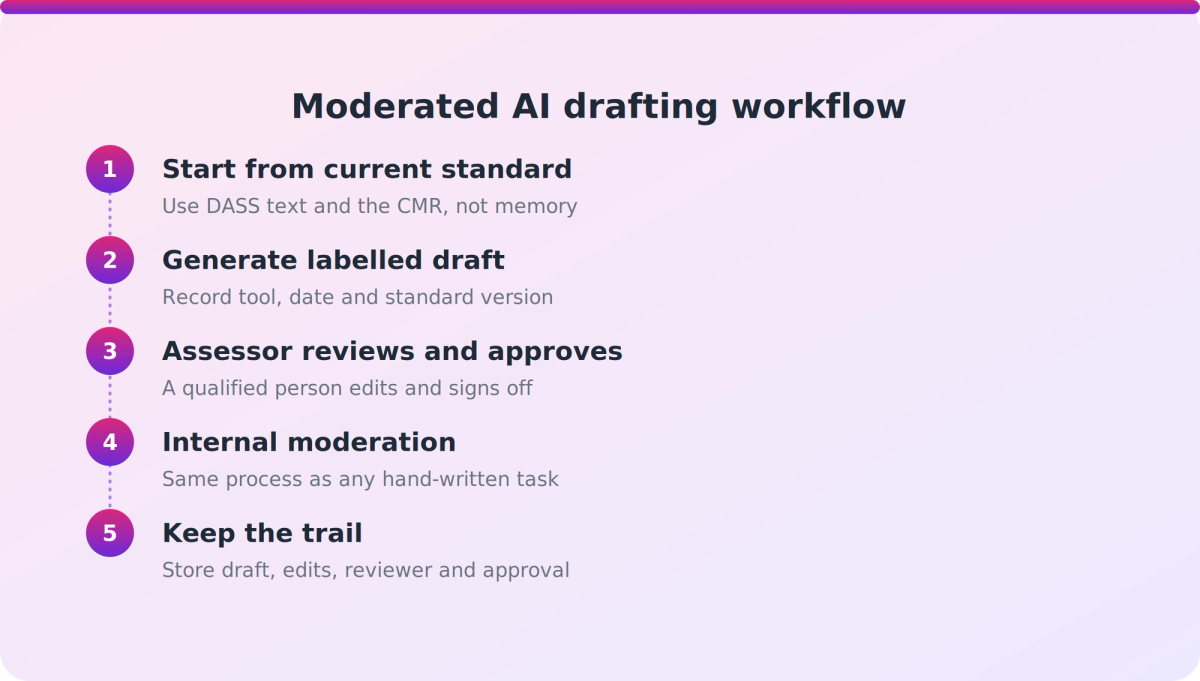
The workflow matters more than the model. Here's a sequence that keeps people accountable at every step:
- Start from the current standard. Feed the tool the current DASS standard text and its CMR, not a summary from memory.
- Generate a draft, labelled as a draft. Record the tool, the date and the standard version used.
- Assessor review. A qualified assessor checks the task against the standard's outcomes and your learners' context, edits it and approves it. The competency decision stays with them.
- Internal moderation. Put the task through your normal pre-assessment moderation, exactly as you would a hand-written one.
- Compliance check and release. Confirm mapping, consent-to-assess scope and the CMR conditions before the task goes to learners.
- Keep the trail. Store the draft, edits, reviewer and approval so you can show how the task was produced.
*Illustrative example:* a trainer drafts a practical task for a skill standard. The AI draft is mapped to the learning outcomes, the assessor rewrites two scenarios to fit local workplaces, and moderation flags one unclear instruction. The final version and the changes are all on file. Nothing about that is faster to defend than a hand-written task, but the drafting is faster.
What should you check before buying an AI assessment writing tool?
Use the same criteria for every vendor, and test them on your own standards.
- Human accountability: does the workflow keep a qualified assessor approving every draft, and can it record who reviewed and approved what?
- Standards mapping: does it work from current DASS unit or skill standard text and the relevant CMR? Can it handle the unit-standard to skill-standard transition with a version trail?
- Output quality: judge it against NZQA's moderation principles of fair, valid and consistent. Run a sample through your internal moderation before committing.
- Audit trail: can you show moderators how a draft was produced, changed and approved?
- Privacy and hosting: where is data hosted, are prompts retained or used for training, and does the vendor support a Privacy Impact Assessment?
- Fit with your quality system: can you update your AI-use policy, self-review and academic integrity settings to cover staff drafting?
- Evidence of results: ask for moderation outcomes and references from comparable PTEs. We found no independent benchmarks of AI drafting accuracy.
- Pricing and support: who maintains the tool when NZQA rules and standards change?
How much does privacy matter if you're only drafting tasks?
It matters, but the exposure varies. The Privacy Commissioner says the Privacy Act applies to everyone using AI tools in New Zealand, and the Simply Privacy summary notes that prompts and training data count as personal information to be kept secure (IPP5). A Privacy Impact Assessment is emphasised before adopting AI systems.
Drafting from standard text alone carries less exposure than pasting learner work into prompts. Decide which you're doing, and write it into policy.
Treat security claims carefully too. "Aligned with ISO 27001 or NZISM" is not the same as certified, so ask for the evidence.
How do you show moderators and NZQA that AI drafting is controlled?
Show the system, not the software. Moderators will apply the same tests to an AI-drafted task as any other, so your evidence is the process around it.
- A written AI-use policy for staff drafting, linked to your quality management system.
- Recorded assessor review and approval for each task.
- A version trail tying each task to a specific standard version.
- Moderation outcomes for AI-assisted tasks, tracked in your annual self-review.
If you can't produce these, the tool is a risk however good the drafts look.
Where does VETos fit?
VETos is Supahuman's product for assessment drafting, and we think it's a fair fit for some NZ PTEs. VETos NZ is described as helping PTEs, polytechnics and wānanga draft assessment tools, assessor guides and learner guides mapped to unit and skill standards. It checks for gaps before validation moderation and keeps a version trail when upgrading unit-standard materials. Its mode-first generation lets trainers choose theory or practical delivery, with each task linked back to the standard's elements and performance criteria.
Supahuman's own material frames output as a draft, not a finished compliant instrument. Competency decisions stay with the assessor, and NZQA assesses your moderation system, not the software.
A few things to verify rather than assume:
- Supahuman states builds are hosted on AWS in Australia with ISO 27001 and NZISM-aligned controls. These are vendor claims, so ask for evidence.
- Mast Academy, a NZ PTE, is reported by Supahuman to have cut NZQA-aligned course authoring from around six weeks to minutes. That's self-reported and not independently verified.
- Supahuman's custom AI Studio suits jobs a product doesn't cover. Its public material doesn't detail moderation steps such as approval gates or audit logs, so ask for a demonstration.
Our take
Most PTEs will end up using AI for drafting. The ones that stay out of trouble will treat it like any other assessment-material source: reviewed, moderated and documented. We'd rather a PTE buy a slightly less impressive tool that records sign-off properly than a dazzling one that leaves no trail. And since the rules about staff AI use are still unclear, the safest move is to write your own policy now and confirm it with NZQA.
FAQ
Can a NZ PTE use AI to draft assessment tasks and still meet NZQA expectations?
Yes, if the drafting sits inside your assessment and moderation system. A qualified assessor must review each draft, it must go through internal moderation, and it must be checked against the current standard and its CMR. NZQA assesses the provider, not the tool.
What does NZQA say about staff using generative AI?
NZQA's published AI guidance is written for schools and kura and concerns student use. We found no NZQA statement specifically on PTE staff drafting assessment tasks with AI, so confirm current expectations with NZQA directly.
What should I check in an AI assessment writing tool before buying?
Check assessor sign-off recording, mapping to current DASS standards and CMRs, an audit trail, privacy and hosting terms, and fit with your quality system. Test it on a sample of your own standards and ask for references from comparable PTEs.
How do I show moderators that AI-assisted drafting is controlled?
Keep a written AI-use policy, recorded assessor approvals, a version trail for each task, and moderation outcomes tracked in your annual self-review. Moderators will apply fair, valid and consistent tests however a task was produced.
Next step
Before you talk to any vendor, pick three of your own standards and draft your AI-use policy for staff. Then trial each tool against both. If you'd like to see how VETos handles that on your standards, book a demo with Supahuman and ask to see the approval and audit trail steps.