No software is approved or certified by ASQA for the Standards for RTOs 2025, because ASQA regulates your RTO's assessment system, not the tool. The useful question is which category of software helps. Authoring and mapping tools can support Standard 1.3 pre-use review and Standard 1.4 evidence, but a qualified person must still review and sign off.
Key takeaways
- ASQA doesn't approve, certify or list software. Treat any "ASQA-compliant" label as a vendor claim to test, not a regulatory status.
- Software falls into three groups: authoring and mapping, validation, and compliance or student management. One product rarely covers all three.
- Judge authoring tools on contextualisation, traceable mapping, version control and human sign-off, not on how fast they produce a draft.
- ASQA names AI risks, including purchased or generic tools that aren't contextualised and AI-assisted assessments left out of validation samples.
- Trial any tool on your own units before you buy.
Is any software approved by ASQA for the 2025 Standards?
No. The research found no ASQA-approved vendor list and no AI-tool certification. Your RTO is audited on its assessment system, and software is only one input to it.
The 2025 Standards took effect on 1 July 2025. The Department of Employment and Workplace Relations describes three elements: the Outcome Standards, the Compliance Standards (including the Fit and Proper Person Requirements and the NRT Logo Conditions of Use Policy) and the Credential Policy. ASQA says the Standards focus on outcomes for students and employers and give providers more flexibility in how they show compliance.
That flexibility cuts both ways. No tool can hand you a compliance stamp, so you need to be able to explain why your assessment tools work.
What do Standards 1.3 and 1.4 ask of your assessment tools?
They ask for two things, and software can only help with part of each.
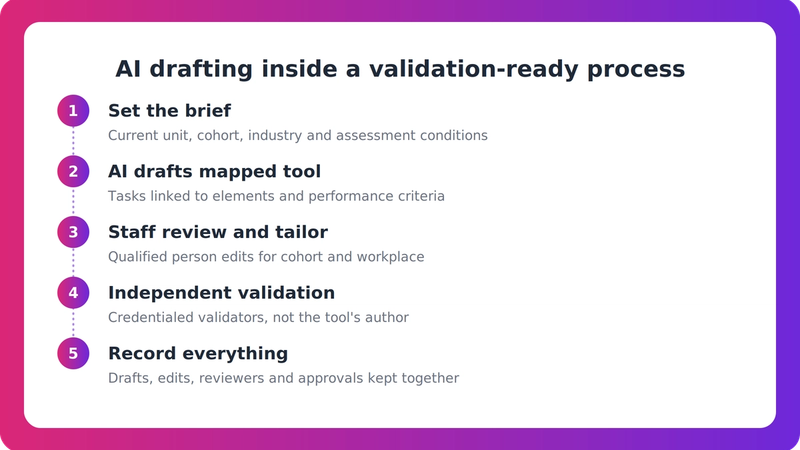
- Standard 1.3: assessment tools must be reviewed before use to confirm assessment can follow the principles of assessment and the rules of evidence. The outcomes of those reviews must inform any necessary changes. New or revised tools introduced after 1 July 2025 must also be reviewed before use. The Standards don't say who must do the review.
- Standard 1.4: assessment judgements must be justified against the rules of evidence. ASQA's Assessment Practice Guide lists these as validity, sufficiency, authenticity and currency.
So a tool can give your reviewer a cleaner starting draft and a clearer mapping trail. It can't be the reviewer.
What types of software support an RTO's assessment system?
The category splits into three groups, and mixing them up is the most common buying mistake.
- Authoring and mapping tools draft assessment tools, assessor guides and mapping documents against units of competency.
- Validation tools support review of tools and assessor judgements. CloudAssess names RTO Radar as an example. CloudAssess is a vendor with its own interests, so read its comparisons accordingly.
- Compliance and student management systems hold learner records and reporting, including AVETMISS.
An authoring tool doesn't necessarily cover the other two. Decide which gap you're actually trying to close, then check what the product deliberately leaves out.
Is it acceptable to use AI to draft assessment tools, and what does ASQA flag?
The research found nothing that bars AI drafting, but ASQA is clear about where the risks sit. Its Assessment Practice Guide lists:
- relying on purchased tools that aren't contextualised to your cohort, learning environment or training product
- using AI to mark assessments without clear oversight
- leaving assessments that incorporate AI tools or outputs out of the validation sample
ASQA has also published AI principles. The Sector reports they introduce no new regulatory requirements and help providers manage AI within existing obligations, including the 2025 Standards. That is a secondary report, so read ASQA's own page before you rely on it.
The practical reading is simple. AI assists a qualified, accountable person, and its output goes through the same review, validation and moderation as anything else.
How do you evaluate authoring and mapping software?
Weigh these criteria in roughly this order:
- Contextualisation. Can it tailor tools to your cohort, industry, delivery mode and training product, or does it output generic content?
- Mapping and traceability. Does it map to elements, performance criteria, performance evidence and knowledge evidence in a form a validator can follow?
- Human review and sign-off. Does the workflow support a qualified reviewer's Standard 1.3 check, with decisions and versions logged?
- Validation support. Can AI-assisted material be included in validation samples and linked to evidence?
- Training package currency. How does it handle superseded units and conversions, such as the move to the ASK format under TPOF 2025? Can it re-map existing tools?
- AI governance and data handling. How is information collected, used, stored and shared, and is AI oversight clear?
- Integration and scope. Does it export to the formats you use, and what does it not do?
- Evidence for claims. Look for independent reviews, named Australian RTO outcomes and transparent pricing and methodology.
Treat pricing, speed, pass-rate and time-saving figures as marketing until you've tested them. One vendor, Knowledge Foundry, states a five-year validation cycle. The research couldn't confirm that against the legislation, so check the Outcome Standards Instrument yourself.
A simple trial plan
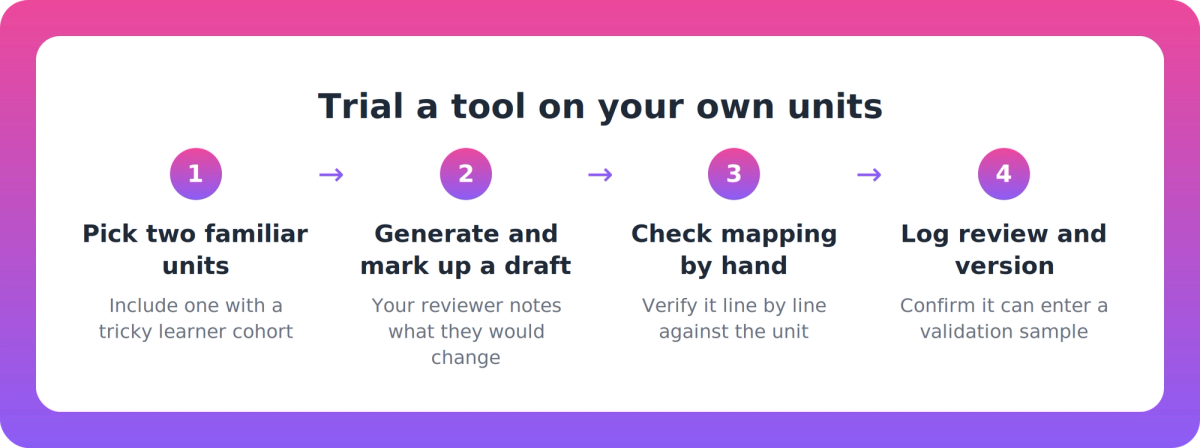
This is an illustrative approach, not a prescribed method:
- Pick two units you know well, ideally one with a tricky cohort.
- Generate a draft and have your assessor or reviewer mark up what they'd change.
- Check the mapping against the unit by hand, line by line.
- Confirm you can log the review, version the tool and place it in a validation sample.
If the draft needs a full rewrite, or the mapping can't be traced, you've learned that for the price of a trial.
Where does VETos fit in this category?
VETos is one authoring and mapping option, and that is the lane it claims. Supahuman's site describes it as drafting assessment tools, assessor guides, learner guides and mapping documents, aligned to the Principles of Assessment and Rules of Evidence. It doesn't market a dedicated Standards 2025 compliance module.
The site says it holds your scope from training.gov.au, maps elements and performance criteria, routes work between authors, validators and quality leads, and keeps version trails. It says it drafts to TPOF 2025 (ASK format), flags superseded units and re-maps tools when units convert. It can write from your own policies and templates, and exports to Word and InDesign. All of that is vendor-reported, so test it in a trial. The vendor describes the output as a defensible starting point, with your people reviewing and signing off.
The limits matter too. A third-party review says it has no AVETMISS reporting or learner records, so you'd still need a student management system. The material we reviewed shows no named Australian RTO case studies, and quantified claims such as "up to 80% less content development time" are vendor-reported. You can read more on the VETos product page.
Our take
Buyers keep asking which tool makes them compliant. That's the wrong question, because compliance lives in your system: who reviews, what they check, what they change and what you can show an auditor. We'd choose the tool that makes a good reviewer faster and their decisions easier to trace, and be wary of any product that promises to take the reviewer out of the loop. If a vendor can't show you its mapping on your own unit, keep looking.
FAQ
Is any software approved or certified by ASQA for the Standards for RTOs 2025?
No. The research found no ASQA-approved vendor list and no AI-tool certification. ASQA regulates your RTO's assessment system, so any "compliant" claim from a vendor is marketing to verify in a trial.
How do I know a tool's drafts will stand up to Standard 1.3 pre-use review?
Test it on your own units. Check that the mapping is traceable, the content suits your cohort and training product, and your qualified reviewer can log decisions and versions. The Standards don't say who must do the review, but your RTO remains accountable.
Is it acceptable to use AI to draft assessment tools?
ASQA's Assessment Practice Guide flags risks rather than a ban: uncontextualised purchased tools, AI marking without clear oversight, and AI-assisted assessments missing from validation samples. Use AI to assist a qualified person, and validate the outputs as normal.
Will the software contextualise tools to my cohort, or give me generic content?
It depends on the product, so ask. Look for tailoring to your cohort, industry, delivery mode and training product, and the ability to draw on your own policies and templates. Generic output is a risk ASQA specifically flags.
Next step
Before you talk to any vendor, write down the two units and cohorts you'd trial and the reviewer who'd sign them off. If you'd like to see how VETos handles that on your own unit, ask Supahuman for a trial conversation.